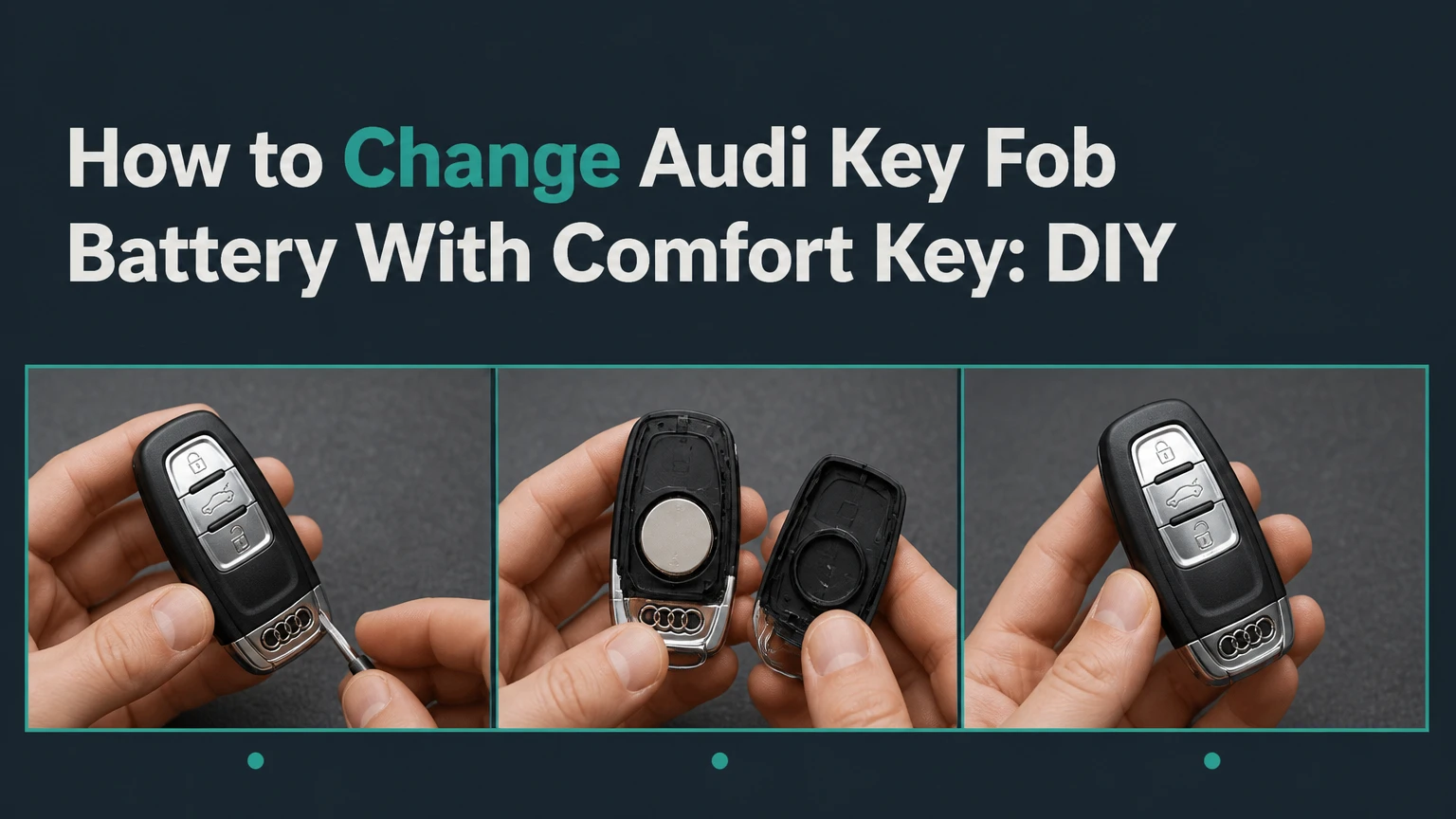
To change an Audi Comfort Key battery, remove the mechanical key, extract the battery tray or rear cover according to the fob design, replace the old cell with a fresh 3-volt CR2032, and reassemble the key. The job usually takes 2-5 minutes, costs $2-$5, and normally does not require vehicle reprogramming.
Key Facts at a Glance
- Most Audi Comfort Key fobs use one CR2032 3-volt lithium coin cell.
- Battery polarity varies by fob design, so copy the orientation of the removed battery.
- A normal battery replacement does not erase the key’s identity or require coding.
- A weak battery can disable passive door unlocking before button-operated locking stops.
- A plastic trim tool or the supplied mechanical key is safer than a large metal screwdriver.
- A fully discharged fob can often start the Audi when placed at the vehicle’s designated backup-reader location.
What Is an Audi Comfort Key?
Audi Comfort Key, also called Audi Advanced Key in some markets and manuals, is a passive keyless-entry and push-button-start system. The vehicle detects an authorized key near the door or cabin, allowing the driver to unlock the car by touching the handle sensor and start the engine without inserting the key.
A Comfort Key is different from a conventional remote key in one important way: the vehicle and fob use proximity communication in addition to button commands. The fob does not need to be actively transmitting at full power every second. The vehicle’s antennas query the key, and the key responds when it detects the appropriate signal. That distinction matters because claims that every Comfort Key constantly broadcasts continuously overstate how the system operates.
Typical battery life is approximately 1-3 years, but usage changes the interval. Frequent passive-entry events, repeated button presses, extreme temperatures, a key stored close to the vehicle, or an aging coin cell can shorten that period. Audi manuals and service information remain the final authority because fob casing and backup-reader locations vary by model and market.
Which Battery Does an Audi Comfort Key Use?
The standard replacement is a CR2032, 3-volt lithium coin cell. Buy a fresh battery from a recognized manufacturer, check the expiration date, and confirm that the old cell is also marked CR2032 before installation.
| Battery specification | Correct value | Practical check |
|---|---|---|
| Battery designation | CR2032 | Match the marking on the removed cell |
| Nominal voltage | 3 volts | Do not substitute a 1.5-volt AA or AAA cell |
| Cell diameter | 20 mm | Confirms the physical coin-cell format |
| Cell thickness | 3.2 mm | Prevents loose or forced installation |
| Quantity required | 1 cell | Keep the spare sealed until needed |
| Typical retail price | $2-$5 | Price varies by brand and country |
CR2025 and CR2016 cells have the same diameter but different thicknesses. They may fit loosely or provide shorter service in a compartment designed for CR2032. Do not use them simply because the coin cell appears to fit. A loose cell can interrupt contact when the key moves in a pocket.
Handle the battery by its edge. Finger oils are not usually an immediate cause of failure, but residue can contaminate contacts and shorten storage life. A clean, dry cloth is useful when the battery must be repositioned.
Before You Start
Audi Comfort Key battery replacement needs one fresh CR2032, a clean work surface, and the mechanical key blade. A plastic pry tool is optional for fobs with a rear cover, while most battery-tray designs open without tools.
| Preparation item | Typical requirement | Why it matters |
|---|---|---|
| Work time | 2-5 minutes | Includes testing after assembly |
| Difficulty | Low | Plastic clips require controlled pressure |
| Replacement battery | 1 CR2032, 3 V | Use a fresh, correctly sized cell |
| Optional tool | 1 plastic trim pick | Reduces scratches on rear-cover fobs |
| Backup tool | Mechanical key blade | Often releases the tray or latch |
| Work surface | Dry, well-lit area | Prevents lost springs and contamination |
Before opening the fob, photograph the old battery in place. The image records the polarity and helps identify whether the positive side faces the tray, the circuit board, or the rear cover. Also inspect the casing for cracks, loose buttons, and moisture residue. Battery replacement cannot repair a broken switch or water-damaged circuit board.
How Do You Identify the Correct Audi Key Fob?
Identify the fob by its release mechanism rather than by the Audi model year alone. The same model line can use different key housings across production years, markets, trim levels, and replacement-key revisions.
| Fob design | First visible clue | Battery access | Common applications, not universal |
|---|---|---|---|
| Battery-tray design | Two release tabs around the blade base | Sliding tray | Many A4, A5, Q5, A6, Q7, and Q8 models |
| Rear-cover design | Blade slot with a latch inside | Removable back plate | Some A3, Q3, and newer replacement fobs |
| Internal-sleeve design | Large ribbed release area | Sliding internal carriage | Several B8 A4, C7 A6, and related keys |
| Older fixed-shell design | No obvious tray or blade release | Casing seam or service cover | Verify against the owner’s manual first |
Do not force a seam because a video shows a similar-looking key. If the first release action does not expose a tray, stop and compare the physical casing with the correct procedure below. Audi key shapes can look nearly identical while using opposite battery polarity.
How to Change Audi Key Fob Battery With Comfort Key
Use the procedure that matches the physical fob, not an estimated model-year range. Remove the mechanical blade first, release the tray or cover with steady pressure, record polarity, install one CR2032, and test every function before discarding the old cell.
Step 1: Prepare and Inspect the Key
Place the key face down on a soft, dry cloth and keep the new CR2032 sealed until the compartment is open. Press each button once and note the existing behavior, including whether the red indicator LED illuminates.
Avoid opening the key over carpet, a vehicle seat, or a drain. Small clips and the coin cell can disappear immediately. Keep the second key away from the work area so the two fobs cannot be confused during testing.
You will know the setup is correct when the mechanical blade release, battery access point, and battery marking are visible. The common mistake is assuming that every Audi key opens from the same side.
Step 2: Remove the Mechanical Key
Press the release button or the paired release tabs at the blade end, then pull the mechanical key straight out. On some housings, the blade is a separate emergency key; on others, a metal loop or short blade slides from the rear of the fob.
Pull in line with the slot. Twisting the blade can load the internal plastic guide and make later reassembly difficult. If the blade does not move, press the release more firmly while maintaining a straight pull rather than prying against the casing.
You will know the step worked when the blade is fully separated and the release mechanism remains flush. The common mistake is using the blade as a lever before the release is fully depressed.
Step 3: Open a Battery-Tray Fob
For a battery-tray design, squeeze the two side tabs at the blade opening and pull the battery tray outward. The tray normally slides from the same end where the mechanical blade was removed.
Keep the tray level so the coin cell does not fall onto the floor. Compare the replacement battery with the old one before removal, then lift the old cell from its retaining edge. In many tray-style Audi keys, the positive side faces downward inside the tray, but the molded polarity mark on the tray takes priority over a general rule.
You will know the step worked when the tray comes out without cracking and the battery recess is visible. The common mistake is squeezing the wrong tabs, which can lock the blade carrier instead of releasing the battery tray.
Step 4: Open a Rear-Cover Fob
For a rear-cover design, remove the mechanical blade and inspect the slot it occupied. A small latch inside the slot releases the rear cover; press that latch with the tip of the blade or a narrow plastic pick, then lift the cover from the released edge.
Some housings use one central latch, while others use two side retention points. Do not insert a screwdriver deeply into the casing because the circuit board and antenna may sit directly below the cover. Work around the latch only.
After the cover is removed, note whether the positive symbol faces upward. Many rear-cover designs place the positive side toward the visible back plate, but the embossed polarity symbol is the controlling instruction.
You will know the step worked when the cover separates cleanly and all clips remain attached. The common mistake is bending the cover across its full length instead of releasing the latch first.
Step 5: Open an Internal-Sleeve Fob
For an internal-sleeve design, press down firmly on the large ribbed black release area while pulling the lower section or internal carriage outward. The battery and circuit mechanism slide from the outer shell as one assembly.
Use pressure directly over the ribbed release surface. Pulling the lower section without pressing the release can stress the rails and snap the retaining lip. Once the carriage is out, remove the old CR2032 and copy its orientation.
Many internal-sleeve Audi fobs place the positive side downward in the battery holder, but polarity is not universal across all housings. Look for a plus sign, spring contact, or battery diagram before inserting the replacement.
You will know the step worked when the internal carriage slides out smoothly and the outer shell remains intact. The common mistake is trying to split the glossy outer shell at its seam, which can damage clips that were never intended to open.
Step 6: Install the New CR2032
Insert one fresh CR2032 in the same orientation as the old cell, unless the holder’s polarity marking clearly shows a different direction. The positive face is the side marked with a plus sign and usually contains the printed battery text.
Seat the cell under the retaining lip before pressing the opposite edge down. Do not force a battery that rocks, sits above the holder, or requires the casing to bow. A loose cell indicates the wrong thickness, a bent contact, or an incorrect holder position.
You will know the step worked when the battery lies flat, the contact spring touches the correct face, and the holder closes without pressure. The common mistake is applying pressure to the center of the cell, which can bend the holder or damage a thin contact.
Step 7: Reassemble and Test the Key
Slide the tray or internal carriage into the housing until it clicks. For rear-cover designs, engage the top tabs first, lower the cover evenly, and press around the perimeter until it sits flush. Reinsert the mechanical blade last.
Test the lock, unlock, trunk, panic, and red LED functions where equipped. Then test passive entry at the driver’s door and start the vehicle with the key inside the cabin. A short delay after installation can occur, but normal operation should return without coding.
You will know the job worked when the casing is closed, the blade locks in place, the LED responds, and the vehicle recognizes the key. The common mistake is testing only the buttons, because passive-entry detection can fail while button operation still appears normal.
What Are the Main Audi Fob Procedures?
The battery-tray method is usually the quickest, the rear-cover method needs the most caution around a latch, and the internal-sleeve method requires the most direct pressure on the release button. The battery specification remains commonly identical, but access and polarity differ.
| Procedure | Opening action | Typical polarity | Tool requirement |
|---|---|---|---|
| Battery tray | Squeeze side tabs and slide tray | Often positive side down | Usually none |
| Rear cover | Release latch inside blade slot | Often positive side up | Blade tip or plastic pick |
| Internal sleeve | Press ribbed release and pull carriage | Often positive side down | Usually none |
| Unidentified casing | Verify manual or key specialist | Do not guess | Plastic pick only |
Model-year ranges are only orientation aids. A 2018 Audi Q5, for example, may not use the same housing as another market’s 2018 Q5 replacement key. The casing’s release hardware is more reliable than a year-based chart.
Does a New Audi Key Battery Require Programming?
A normal CR2032 replacement does not require key programming because the battery powers the existing transmitter and does not change the key’s stored identification. Coding is normally necessary only when the entire key is replaced, a control module is changed, or a separate synchronization fault exists.
A low battery can produce a “key not detected” warning without erasing the key. If the new battery is installed correctly and the vehicle still cannot recognize the fob, check the battery’s voltage and orientation before assuming that programming is needed.
Dealer and locksmith procedures differ by model. An Audi dealer may use factory diagnostic equipment for a replacement key, but that service is separate from inserting a new coin cell into an existing functioning fob.
What If the Battery Dies Completely?
A completely discharged Comfort Key can often unlock the driver’s door with the mechanical blade and start the Audi through a backup-reader location. The precise reader location differs by vehicle, so the owner’s manual is more reliable than a universal internet instruction.
Common backup-reader locations include a marked area near the steering column, a slot in the center console, or a designated position near the front cup holder. Place the entire fob at that location while pressing the Start/Stop control. The vehicle can read the passive transponder even when the coin cell cannot operate remote functions.
Remove the blade cover from the exterior driver’s handle if no key cylinder is visible. Cover designs vary, and forcing the painted trim can cause damage. If the mechanical blade will not turn, stop rather than applying excessive torque, because a frozen lock cylinder may require service.
How Much Does Comfort Key Battery Replacement Cost?
A DIY replacement typically costs $2-$5 and takes 2-5 minutes. A dealership or independent locksmith may charge approximately $10-$30 for a simple battery service, while a dealer visit that includes inspection, labor, or unrelated diagnosis can reach $50-$100.
| Replacement option | Typical price | Typical time | Best use |
|---|---|---|---|
| DIY CR2032 | $2-$5 | 2-5 minutes | Recognizable, undamaged fob |
| Independent locksmith | $10-$30 | 5-15 minutes | Unclear latch or fragile housing |
| Audi service department | $50-$100 | 15-60 minutes | Battery plus vehicle diagnosis |
| Complete replacement key | $200-$600+ | Same day to several days | Lost, damaged, or unrepairable key |
Prices vary by country, dealer labor rate, and whether the technician diagnoses a vehicle-side fault. A battery-only appointment should not be confused with cutting and programming a new Audi key, which involves security procedures and much higher costs.
Common Mistakes and How to Fix Them
Installing the Battery Backward
If the LED remains dark and the vehicle ignores the key, remove the cell and compare its plus sign with the holder marking. Reverse the battery only after confirming the correct orientation for that housing.
Using the Wrong Coin Cell
A CR2025 or CR2016 can create poor spring contact in a CR2032 holder. Replace it with the specified CR2032 rather than adding foil, bending the spring excessively, or forcing the cover closed.
Breaking the Housing Clips
Large screwdrivers apply concentrated force and leave gouges around the seam. Reassemble a partially opened fob, then use the blade release or a plastic pick at the designed latch instead of continuing to pry.
Pinching the Perimeter Seal
Some fob housings use a gasket or sealing interface to limit moisture entry. Keep the seal flat in its channel, remove debris with a dry lint-free cloth, and do not close the casing over a displaced rubber edge.
Replacing a Good Battery for a Vehicle Fault
If the LED works and the new battery measures correctly but passive entry fails, move the key away from a smartphone, wireless charger, laptop, or second key. Test the spare key and inspect whether the fault affects one fob or both.
Assuming Synchronization Is Lost
A red LED does not prove that the car’s receiver is working, and a key-not-recognized warning does not automatically mean desynchronization. Check polarity, cell voltage, contacts, and the backup-reader procedure before seeking programming.
What Should You Do If Buttons Work but Passive Entry Fails?
If button commands work but passive entry fails, test the key away from electronic interference, install a verified fresh CR2032, and compare the result with the spare key. Passive entry depends on the vehicle’s proximity antennas and the fob’s low-power response, so button operation alone does not clear the entire system.
Walk several steps away from the Audi, lock it with the button, and return with the key in a pocket separate from a phone. If the spare key works normally, the affected fob likely has a weak cell, poor contact, damaged antenna, or casing fault. If neither key works, inspect the vehicle battery and consult the Audi owner’s manual for system-specific diagnostics.
How Can You Extend Comfort Key Battery Life?
Store the key away from the vehicle when parked at home and avoid pressing buttons inside a pocket. A Faraday pouch can reduce relay-attack exposure and may reduce unnecessary proximity activity, but the pouch must fully shield the fob and should not be used while driving.
| Practice | Expected benefit | Limitation |
|---|---|---|
| Keep key 3-5 meters from parked Audi | Reduces unintended proximity events | Not practical for every home layout |
| Use a tested Faraday pouch overnight | Limits radio exposure | Must remove key before vehicle use |
| Replace at first low-battery warning | Prevents lockout risk | Does not repair damaged contacts |
| Keep spare key in a dry drawer | Preserves backup access | Do not store its loose coin cell with metal |
| Avoid hot dashboards and freezing storage | Reduces battery stress | Normal outdoor temperature still affects life |
A spare battery should remain sealed in its original package, not loose in a glove compartment beside coins or tools. Lithium coin cells also require safe disposal because children and pets can swallow them.
When Should You Use a Dealer or Locksmith?
Use a dealer or qualified automotive locksmith when the casing is damaged, the mechanical blade will not release, both keys fail after verified battery replacement, or the vehicle requires a new key rather than a new cell. DIY replacement is appropriate when the fob opens normally and the only symptom is a low-battery warning.
An independent locksmith may offer a lower-cost battery service and can test the fob’s radio output. An Audi dealer is the better choice for vehicle-side receiver faults, replacement-key authorization, immobilizer problems, or a key that has suffered water intrusion.
Battery replacement is not a remedy for a cracked circuit board, worn microswitch, missing key authorization, or a discharged vehicle battery. Knowing that boundary prevents repeated coin-cell replacements that cannot solve the actual fault.
Frequently Asked Questions
Can I Change an Audi Comfort Key Battery Without the Mechanical Key?
Usually, no. The mechanical key commonly exposes or releases the battery tray, rear-cover latch, or internal sleeve. Remove it first, but do not use the blade as a pry bar unless the casing specifically provides a release point inside the blade slot.
How Do I Know Which Side of the CR2032 Faces Up?
Copy the removed battery’s position and confirm the plus symbol molded into the holder. Battery-tray and internal-sleeve Audi fobs often place the positive face downward, while some rear-cover housings place it upward. Audi fob designs do not share one universal polarity direction.
Why Does My Audi Say Key Not Recognized After Replacement?
The most common causes are reversed polarity, a weak or incorrect coin cell, poor contact, electronic interference, or a damaged fob. Recheck the holder, test the spare key, and use the vehicle’s backup-reader location. Programming is not the first diagnosis after a simple battery change.
Can a Dead Comfort Key Still Start the Car?
Often, yes. Unlock the vehicle with the mechanical blade, then place the fob at the model-specific backup-reader location while pressing Start/Stop. The vehicle can read the passive transponder even when the coin-cell-powered remote and proximity functions are unavailable.
Is a CR2025 Acceptable Instead of a CR2032?
No, not as a routine substitute. A CR2025 is thinner and can produce unreliable spring contact in a holder designed for a CR2032. Install the size printed on the original battery or specified by the Audi owner’s manual.
How Often Should I Replace the Battery?
A typical Comfort Key battery lasts 1-3 years, although frequent use and temperature exposure can shorten that interval. Replace it when Audi displays a low-battery warning or when passive entry becomes intermittent, rather than replacing it on a fixed schedule without testing.
The Bottom Line
Changing an Audi Comfort Key battery is usually a 2-5 minute, $2-$5 repair that needs one CR2032 cell and no vehicle reprogramming. Remove the mechanical key, identify the tray, rear-cover, or internal-sleeve design, copy the original polarity, and test both remote buttons and passive entry. For the exact keyword task, how to change audi key fob battery with comfort key depends primarily on the physical casing, not the model year alone.


